Online appointment scheduling for your business
Kalendar takes the bookings, remembers the clients, collects the payment and sends the reminders — so the calendar looks after itself while you do the work.
Free plan forever · No card required · Greek and English
Built in Greece for hair salons, clinics, garages, studios and professional practices
Bookings taken while you are with a client or closed
Ready-made business setups, from salon to law firm
Languages on every booking page, Greek and English
To start, on a free plan that does not expire
Class packs and memberships, sold and tracked for you
Gyms, studios and trainers sell sessions in bulk. Kalendar now sells the pack or the membership, takes the payment, issues the receipt — and counts every class off as your clients book.
- Packs of n sessions, or memberships billed monthly, quarterly or yearly.
- Choose which services each one covers, and what each one costs in credits.
- Sold online through your own Viva Wallet or PayPal, or at the front desk.
- The credit is used up automatically at booking, and returned on an early cancellation.
- Clients see what is left, and when it expires, on their own page.
- Memberships renew by card, or with an email and a payment link.
On Group and Business — from 28 € / month, billed yearly
Your booking link, now a website for your business
No separate website to build, host or keep up to date. Kalendar turns the page your clients already book on into a one-page site in your own colours — and every service on it can be booked on the spot.
- Five ready colour sets, or your own brand colours.
- A cover photo, a headline and up to three key facts.
- Your services shown live, with duration, price and a Book button.
- About, Team, Reviews and Contact sections, each one optional.
- Opening hours, a map and your social links.
- In Greek, English or both.
On Solo, Group and Business — from 13 € / month, billed yearly
Everything an appointment needs, in one place
Not just a calendar. Kalendar covers the whole life of a booking — from the moment a client picks a time to the payment, the record and the follow-up.
Appointment types
One-to-one, group, collective and round robin. Each with its own duration, price, location and questions.
Availability that fits reality
Multiple schedules per person, buffers before and after, notice periods and daily limits.
Packs and memberships
Sell a 10-class pack or a monthly membership, online or at the desk. Credits are used up automatically as clients book.
Your business website
Turn your booking link into a one-page website in your own colours — services, team, reviews and contact, with booking built in.
Clients and records
A card per client with the fields your trade actually keeps, plus notes, tags, history and no-show counts.
Files for each client
Share an exercise plan, a diet, a scan or a link with one client — it appears on their own private page.
Client portal
A private page where clients see their appointments, their details and move a booking themselves.
Consents and signatures
A GDPR notice, terms of cooperation and consent declarations, signed digitally at booking and filed for you.
Payments and deposits
Charge for an appointment at the moment it is booked, through Viva Wallet or PayPal, in your own account.
Receipts and invoices
Issue a receipt or an invoice from the appointment, with your own numbering, VAT and a PDF — credit notes included.
Import and export
Bring your client list in from CSV or Excel, and take it out again whenever you like.
Automations
Reminders, confirmations, follow-ups and webhooks, triggered before or after any appointment.
SMS to clients
Confirmations, reminders and cancellations sent as a text as well as an email, through your own Apifon account.
Routing forms
Ask a few questions, then send each client to the right person, team or appointment type automatically.
Reporting
Completed, cancelled and average duration, broken down by appointment type, person and period.
Users, teams and permissions
Invite colleagues, group them into teams, and build user types that say exactly which parts of Kalendar each one can open.
Calendars and meetings
Google and Outlook calendars stay in sync. Google Meet, Zoom and Teams links are created for you.
Your own booking page
Your logo, your colours, your link — and a separate page per person, team or location.
Mobile and API
Android and iOS apps for notifications on the move, and a documented API for everything else.
What is new in Kalendar
The last release turned Kalendar from a booking link into the place the whole client relationship lives.
A file for every client, on their own page
Attach files and links to a client’s card — a training programme, a diet plan, a scan, a price quote, a Google Drive or YouTube link — and they appear on that client’s private page, ready to open or download. Tell the client by email with one tick, or not. Uploads are stored privately and open only from the client’s page or your admin, never at a public address. PDF, Word, Excel, PowerPoint and images up to 20 MB each, with 1 GB of storage on Solo, 2 GB on Group and 5 GB on Business.
Sell the pack, not just the class
Create class packs and memberships — 10 classes in 60 days, unlimited classes a month, at most 3 a week, an intro offer once per client — and choose which services each one covers. Sell them at the front desk or online through your own Viva Wallet or PayPal account, with a receipt for the sale. Clients book and the credit comes off on its own, see what is left on their own page, and get a note when they are running low. Memberships renew by card or with a payment link. On Group and Business.
A website, not just a booking link
Your Kalendar link can now open on a one-page website of your own: a cover photo, your headline, your services with prices and free times, and About, Team, Reviews and Contact sections you switch on as you need them. Pick a ready colour set or your own, a font style and a layout, in Greek, English or both — and the booking pages behind it wear the same colours. On every paid plan.
A text, not just an email
Connect your own Apifon account and Kalendar texts your clients alongside the emails it already sends — the booking, the reminder before it, a cancellation, a change of time, and a booking still waiting to be paid. Each message has its own wording you can edit, in Greek and in English, with the same placeholders the emails use. On every paid plan.
The receipt is issued before they reach the door
Issue a receipt or an invoice straight from the appointment — your own numbering series, VAT per line, your details and the client’s frozen onto the document, and a PDF to send or print. An online payment can issue it for you, and a credit note undoes one that was already given out.
Say what each person can open
Build a user type once — a named set of permissions across appointments, clients, receipts, payments, reporting and settings — then hand it to as many colleagues as you like. Each area is either invisible, readable or editable, and the owner’s own access can never be ticked away.
Bring your client list with you
Import your clients from a CSV or an Excel file, matching the columns yourself so nothing is written on a guess — or start from a ready-made template. Export the whole list, custom fields included, any time you want it back.
Forms that get signed, not printed
Write your GDPR notice and terms of cooperation once, then ask for them at booking — with a tick, or with a real signature drawn on screen. Every signature keeps the exact text that was read, the time and the IP address, downloads as a PDF, and is asked for again on its own the moment you change the wording.
A record for every client
Every booking now builds a client card. Custom fields per business type — hair type and colour formula for a salon, plate and mileage for a garage, allergies and medication for a clinic — plus private notes, tags, and counts of cancellations and no-shows.
A page your clients own
Each client gets a private link showing their upcoming and past appointments, the details you hold on them, and a way to move a booking that has not happened yet. No account, no password — and your private notes never appear on it.
Get paid when they book
Connect your own Viva Wallet or PayPal account and take the fee, or a deposit, at the moment of booking. The money goes straight to you — Kalendar never sits in the middle.
Set up in minutes, not evenings
Pick your line of work at signup and the account arrives ready: your usual services with the right durations, the questions worth asking at booking, and the client fields your trade keeps.
Clients reschedule themselves
Allow rescheduling per appointment type and clients move their own booking within the limits you set, instead of calling to cancel.
Send from your own mailbox
Connect Gmail or Microsoft 365 with a single sign-in and confirmations and reminders go out from your address, not a generic one.
How Kalendar works
Six steps from an empty calendar to a booked, paid and confirmed appointment.
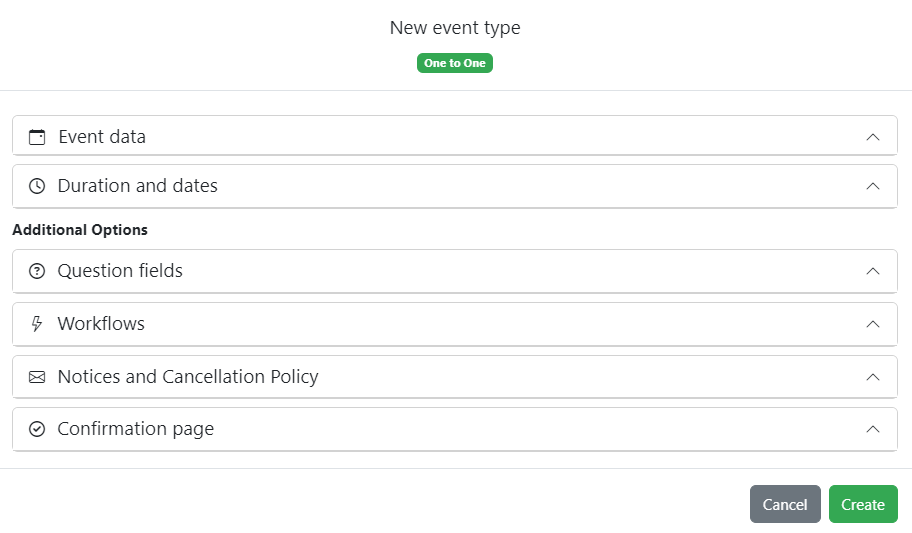
Create an appointment type
Name the service, set how long it takes, where it happens and when you are available. Kalendar gives it its own link.
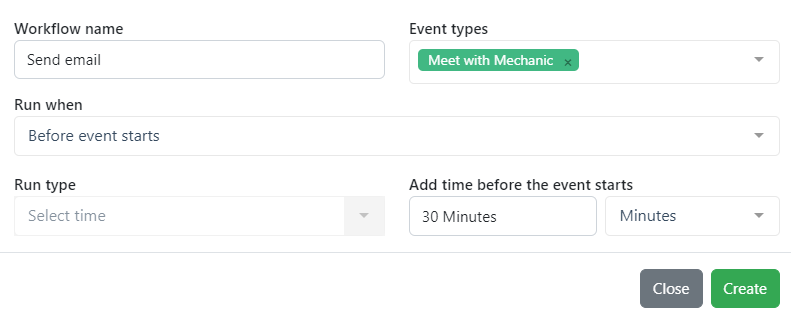
Add your automations
Decide what should happen and when — a confirmation on booking, a reminder the day before, a follow-up after, or a webhook into another system.
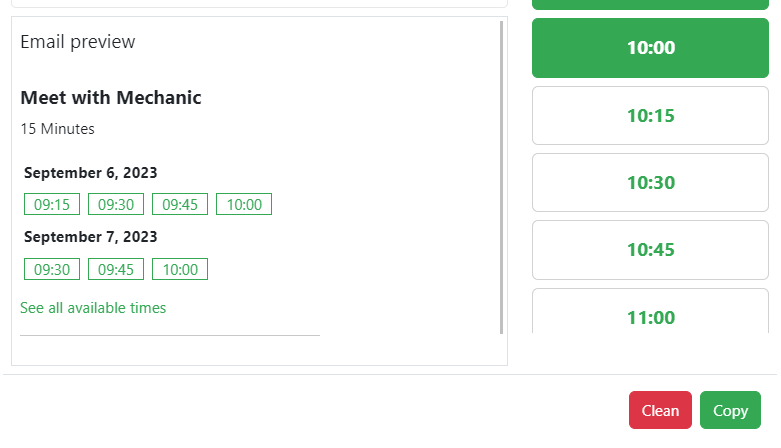
Share the link
Put it on your site, in your bio or in an email. Send a routing form instead and each client is guided to the right service on their own.
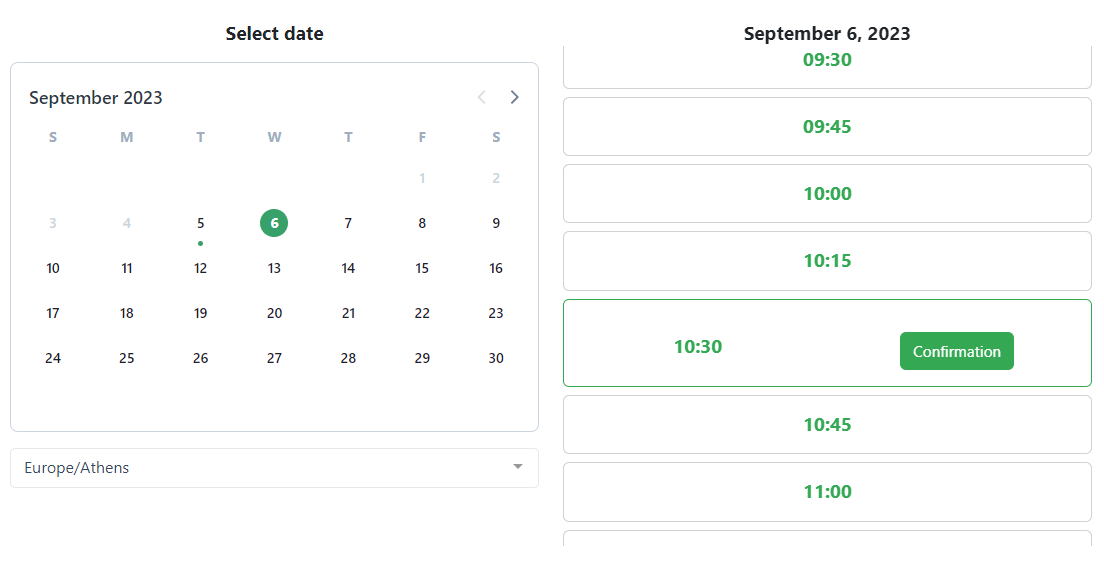
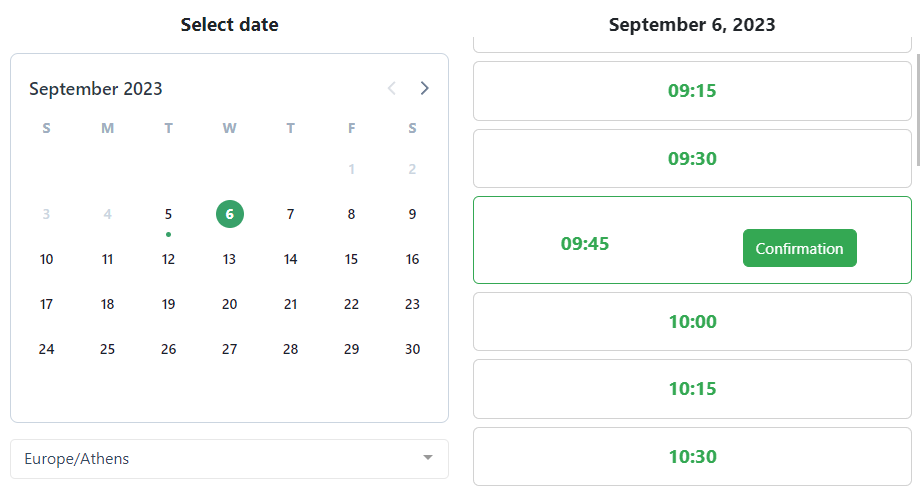
The client picks a time
They see only the times that are genuinely free, in their own time zone, in Greek or English.
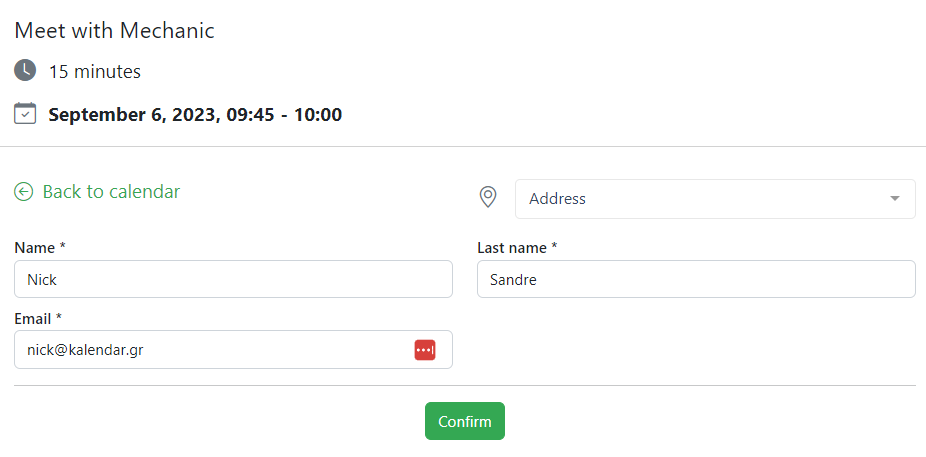
They answer and pay
They fill in the questions you set for that service and, if you ask for it, pay the fee or a deposit by card or PayPal on the spot.
Everyone gets confirmed
The appointment lands in your Google or Outlook calendar, the meeting link is created, both of you get the email, and the client card is updated.

Works with what you already use
Kalendar reads your calendar so it never double-books you, and writes each appointment back where you expect to find it.
Learn moreSet up for your line of work
Choose your trade at signup and the account is created with the services, durations, booking questions and client fields that trade actually uses. Change anything you like afterwards.
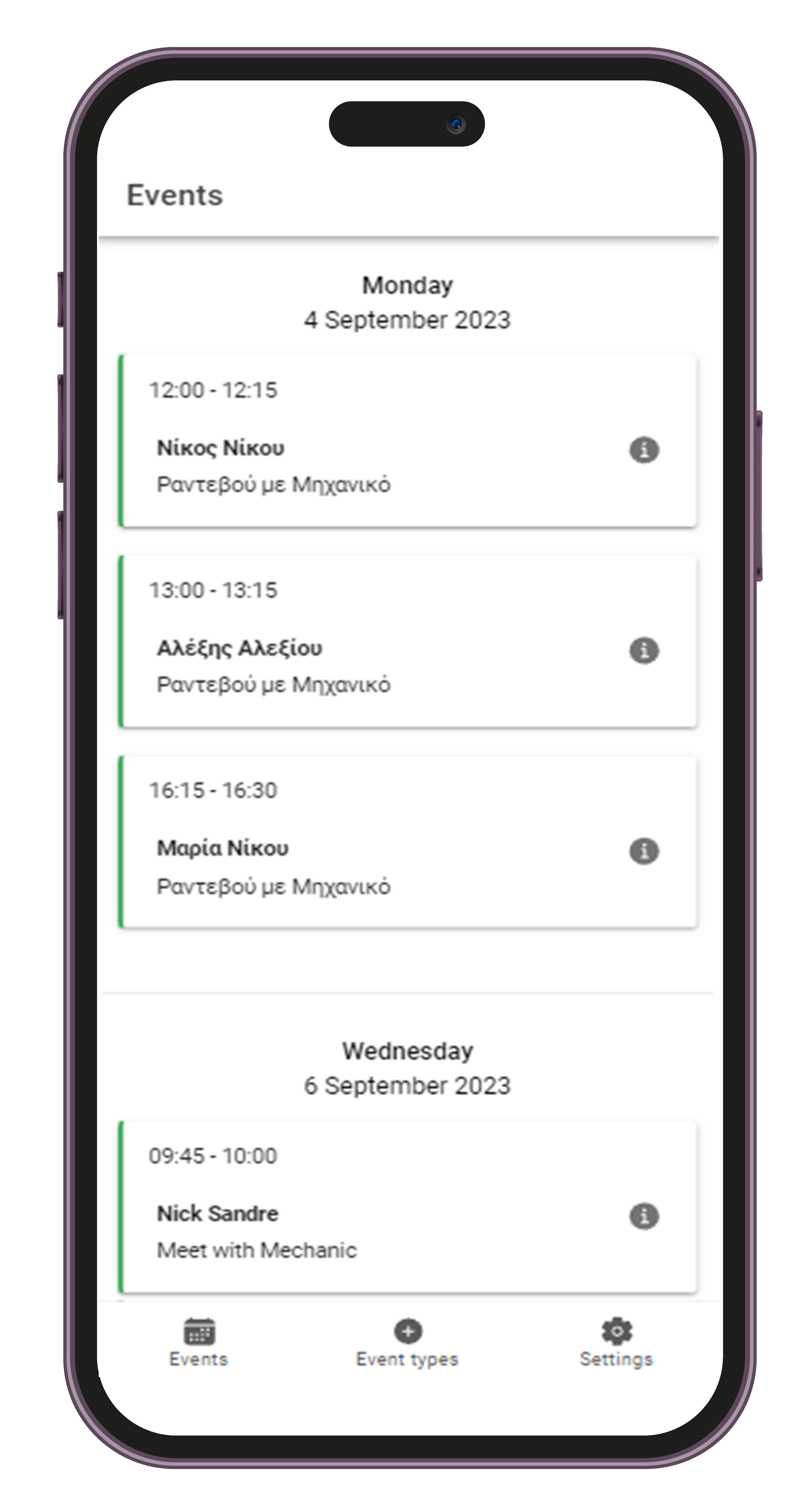
Your calendar, wherever you are
A push notification the moment a booking arrives or is cancelled. Check the day ahead, open a client, edit an appointment type and update your availability from your phone.


Your data, handled properly
Appointments carry personal information. Kalendar is built and hosted so that it stays yours.
Encrypted and backed up
Traffic over HTTPS, data encrypted at rest, and a backup taken every day.
GDPR by design
Minimal data collected, exported or deleted on request, and a written privacy policy.
A full audit trail
Every change to an appointment, client or setting is logged with who did it and when.
Permissions that mean something
Decide per user what they can see and change — their own bookings, their team’s, or everything.
Frequently asked questions
The things people ask before they sign up.
Extended support, or work to customise the application for you, is charged separately depending on what you need.
You pay inside the application by card or PayPal, and you can change plan or stop at any time without losing your data.
On a paid plan you can also connect an Apifon account and text your clients.
Every signature is stored with the exact text that was read, the date, the time and the IP address, and downloads as a PDF from the client’s record. If you change the wording, Kalendar asks for a fresh signature at the next appointment.
The messages are sent under your own approved sender name, and Apifon charges you for them directly.
You can set it up on the free plan and it goes live as soon as you upgrade. If you already have a website, keep it and link to your Kalendar page as before.
When a client books, the credit is used up automatically, and an early cancellation gives it back. Clients see their remaining classes and expiry date on their own page, and memberships renew by card or with an email and a payment link.
PDF, Office documents and images are accepted up to 20 MB each. Uploads are stored privately and never at a public address. Storage is 1 GB on Solo, 2 GB on Group and 5 GB on Business.
Start taking bookings today
Create your account, pick your line of work, and your booking page is ready in a few minutes. Free plan, no card, nothing to install.
No card required · Free plan forever